
End-of-side distortion, sibilance on vocals, and one channel going quiet are almost always setup faults, not bad records. In my experience the cause splits four ways: tracking force set too light, an overhang or null-point geometry error, anti-skate pulling the stylus off-center, or an azimuth tilt that unbalances the channels. Fix the geometry and the gauge readings first, and most of what people blame on “the pressing” disappears.
This is the hub page for everything I have written on inner-groove distortion and channel balance. It covers why the last song on a side sounds rough, why sibilants spit, and why your right channel can drop a couple of decibels — and it links out to the deeper spoke articles where I work each one through with protractor logic and gauge numbers.
What Inner-Groove Distortion Actually Is
Inner-groove distortion is a tracing problem, and it is built into the physics of the format. A record spins at a constant angular speed — 33⅓ rpm — but the linear speed of the groove under the stylus falls as the groove spirals inward. At the outer edge a groove is moving past the stylus at roughly 0.5 meters per second; by the run-out near the label it can be closer to 0.2 m/s. The same musical waveform has to be squeezed into a shorter and shorter length of vinyl.
That matters because high frequencies are cut as tight undulations in the groove wall. When the groove is moving slowly, those undulations get packed together at a physical wavelength that approaches the size of the stylus tip itself. The stylus can no longer follow the true shape of the groove — it traces a rounded-off approximation of it — and the output gains harmonic distortion, especially on the left channel, which the cutter geometry cuts at a higher velocity. The audible result is a hard, grainy, splatty sound on loud passages, sibilance on vocals, and a loss of air on cymbals, all concentrated in the last two or three minutes of the side.
None of that is opinion. It is the reason cutting engineers used to ask mastering studios to keep the loudest, brightest material toward the outside of the disc and push quiet ballads to the inside. You can hear the format working against you on any well-cut record if you listen for it — and a well-set-up table makes it dramatically less obvious.
The Setup Variables That Control It
Four adjustments on the turntable decide how bad inner-groove distortion gets on a given deck, and they are all things you can measure. I list them roughly in the order I check them when a customer-side complaint comes in.
Tracking force (VTF). Run a cartridge too light and it cannot maintain contact with the groove wall through the sharp inner-groove accelerations; the stylus briefly loses tracking and the distortion spikes. Run it too heavy and you get mistracking of a different kind, plus accelerated record wear. Every cartridge has a specified range — typically 1.5 to 2.0 grams for a moving-magnet — and the right answer is almost always near the top of that range, not the bottom. I cover the full method in the tracking force adjustment guide.
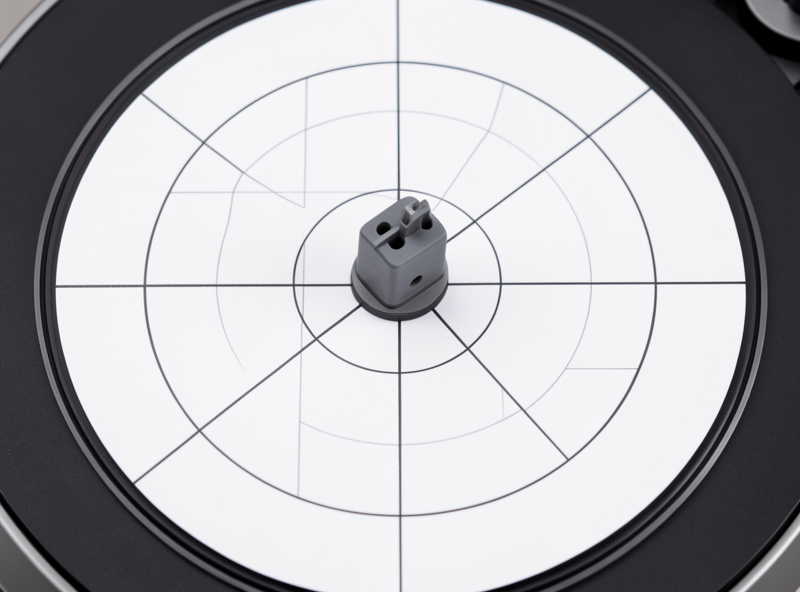
Overhang and null-point geometry. The tonearm pivots, but the groove is cut by a lathe moving in a straight line. No pivoting arm can perfectly track that straight line, so we use a compromise geometry — Baerwald or Stevenson — that places two zero-error “null points” on the record. Get the overhang wrong and the error everywhere else balloons, with the worst damage at the inner groove. The dedicated overhang distortion spoke walks through this in detail, and the cartridge alignment guide is the full protractor walkthrough.
Anti-skate. The same geometry that creates tracking error also generates a sideways force that pushes the tonearm toward the center of the record. Anti-skate applies a counter-force to keep the stylus centered in the groove. Set it wrong and one channel wears harder and distorts first — usually the right. The anti-skate and inner-groove distortion article covers what I actually heard when I dialed it deliberately off; the general method is in the anti-skate setting guide.
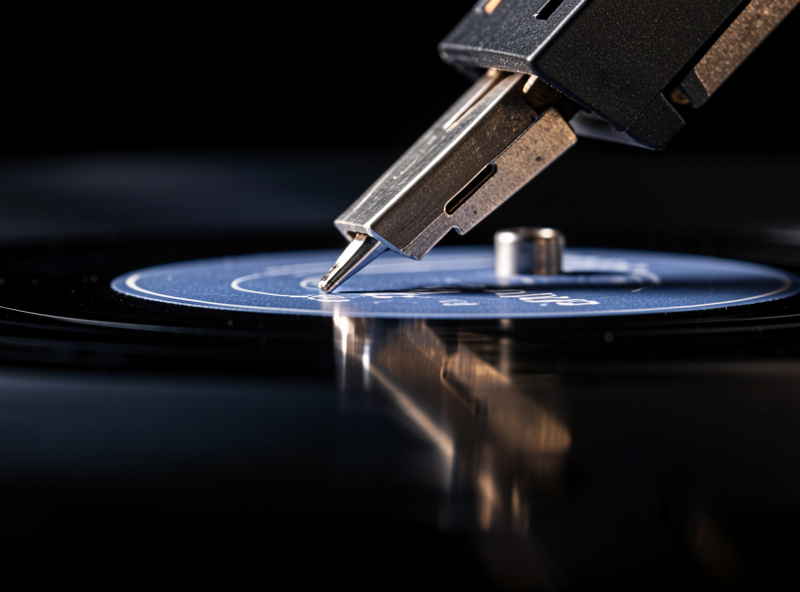
Stylus profile. This is the one variable that costs money. A conical (spherical) stylus tip has a relatively large contact radius and physically cannot resolve the tight inner-groove wavelengths, so it distorts there no matter how perfect your alignment is. An elliptical, and better still a Shibata or MicroLine profile, has a smaller contact footprint and traces the same grooves far more faithfully. The tradeoff is laid out in the table below and explored in the stylus types comparison.
| Stylus profile | Contact shape | Inner-groove tracing | Record wear | Typical tier |
|---|---|---|---|---|
| Conical / spherical | Round tip, large contact radius | Weak — rounds off tight wavelengths | Higher per gram | Budget OEM and entry MM |
| Bonded elliptical | Elliptical, front-back narrowed | Good — major step up at the inner groove | Moderate | Mid-range MM (2M Red class) |
| Nude elliptical | Solid elliptical, lower mass | Very good — flatter, cleaner top end | Lower | Upper MM (2M Blue/Bronze class) |
| Shibata / MicroLine | Line-contact, multi-radius | Excellent — closest to the cutter | Lowest when aligned | Top MM and entry MC |
Read that table as the single biggest lever, after geometry, for taming the inner groove. A nude elliptical or a Shibata on a properly aligned arm will track a record clean to the last groove where a conical on the same arm will start to splatter — same table, same record, same force. If you want the deeper dive on choosing, the best moving-magnet cartridge shortlist is built around exactly that criterion.
The Two Alignment Geometries: Baerwald Versus Stevenson
Once you accept that a pivoting arm cannot track a straight-cut groove perfectly, the question becomes where you choose to place the error. The two-point protractor exists to push the worst of that error onto two zero-error null points and spread the remaining error as evenly as possible. The two standards you will see printed on every protractor — Baerwald and Stevenson — are different answers to that placement question, and the choice matters at the inner groove.
Baerwald (often written Lofgren A) places its null points at roughly 66.0 mm and 120.9 mm from the spindle. It minimizes the worst-case tracking distortion anywhere on the record, which gives you a flat, even error curve across the whole playing surface. Most modern cartridge setups and most aftermarket protractors default to Baerwald for that reason — it is the safe, balanced choice that never lets any single band get bad.
Stevenson places its inner null point at 60.325 mm, which lines up with the inside edge of the standard IEC playing band, and its outer null at 117.42 mm. The trade-off is deliberate: Stevenson accepts a little more distortion through the middle of the record in exchange for hitting zero error right at the innermost grooves, exactly where the format is most fragile. A lot of factory tonearms — Rega’s, prominently — are drilled for Stevenson geometry, so the arm’s fixed mounting distance is already correct for it.
The practical upshot is that if your inner-groove complaint is the one thing you cannot solve, Stevenson’s inner-null placement can buy you a real fraction of cleanliness at the end of the side, at the cost of a slightly rougher middle. On a tonearm with cartridge slots you can choose either by sliding the cartridge fore and aft to line up the correct pair of null points on the printed protractor. Whichever you pick, the accuracy of the printed scale and the squareness of the cartridge in the headshell matter more than which standard you align to — a sloppy Baerwald alignment beats a perfect-in-theory Stevenson you set with a crooked body. The full protractor walkthrough, including how to verify the printed scale against a steel rule before you trust it, is in the cartridge alignment guide.
Why the Last Song on the Side Suffers Most
Everything above converges on the same place. The inner groove is where linear speed is lowest, where wavelengths are tightest, where tracing error from a pivoting arm is usually highest, and where anti-skate force is doing the most sideways work. So when one specific symptom shows up — the last track on the side turning harsh, or a vocal sibilating only at the end of a record — the diagnosis points inward almost by definition. I wrote a whole spoke on that single complaint because it is the most common one I get: last track on the side sounds distorted.
Sibilance — the “sssh” on vocals turning into a spitty T sound — is the audible signature of the same tracing failure, and it is almost always the stylus profile or the alignment rather than the record. A worn or chipped tip makes it worse, which is why a sudden onset of sibilance across every record is a stylus-wear red flag. That one gets its own treatment in sibilance and distortion on vocals, and the timeline for when a worn tip is actually the cause is in when to replace your turntable stylus.
Channel Balance: When One Side Goes Quiet
Channel imbalance is the other half of this cluster, and it gets bundled in here because it shares the same root causes and the same diagnostic bench. If your right channel is a couple of decibels quieter than the left, or noticeably noisier, the record is the last place to look. The usual suspects are azimuth, tonearm wiring, and a cartridge body that has tilted in the headshell.
Azimuth is the front-to-back tilt of the stylus in the groove — whether it sits perpendicular to the record or leans to one side. Lean it even a degree or two and one groove wall gets traced with more pressure than the other, which directly unbalances the two channels and adds crosstalk. I set it by reflection in a small mirror and confirm it with a crosstalk measurement; the full method is in the azimuth adjustment guide, and the specific right-channel-quiet symptom is isolated in channel imbalance on vinyl.
Wiring and connections are the other frequent cause, and they are cheaper to rule out before you chase geometry. A tonearm lead with a high-resistance solder joint, an RCA plug that has oxidized, or an internal headshell wire that has worked loose will all drop level on one side. Before I touch azimuth I always swap the left and right interconnects at the phono stage input — if the quiet channel follows the cable, the problem is downstream of the table. The closely related “one channel is noisier” symptom is covered separately in one channel noisier than the other, because the diagnosis branches differently.
The Order I Diagnose and Fix Distortion In
When a distortion complaint lands on my bench I work it in a fixed order, because chasing the expensive causes before the cheap ones wastes time. Here is the sequence I use, and it is the same one the spoke articles follow.
1. Confirm it is not the record. Play the same passage on a second pressing or a clean copy if you have one. If only one specific record distorts at one specific spot, you are likely looking at groove damage — see telling record damage from mistracking and the related skips at the same spot article.
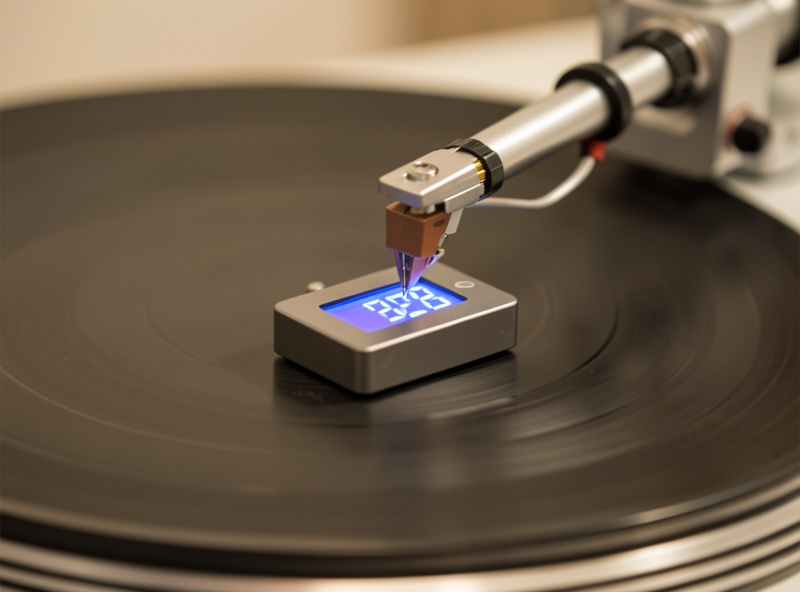
2. Check tracking force with a gauge. Forget the calibration dial on the tonearm — it is a reference, not a measurement. Set the force to the upper third of the cartridge’s specified range using a digital gauge reading to 0.01 g. A digital stylus force gauge costs less than a single new record and removes the single biggest source of distortion I see. As an Amazon Associate I earn from qualifying purchases.
3. Re-check overhang and alignment. Put the protractor on, confirm both null points, and re-square the cartridge in the headshell. A two-point Baerwald protractor is the one I reach for; print one at full scale and verify the printed scale against a ruler before trusting it. This single step clears a surprising fraction of inner-groove complaints.
4. Re-set anti-skate to match. Once force and geometry are correct, dial anti-skate so the tonearm drifts slowly inward on a blank lead-in groove, then back off slightly. It should track a heavily modulated passage without the right channel breaking up first.
5. Set azimuth by reflection, then measure. Get the stylus perpendicular to the groove and confirm both channels are within a decibel. If azimuth is correct and a channel is still off, move to wiring.
6. Consider the stylus profile last. If everything above is correct and the inner groove still distorts, the profile is the ceiling. This is where a nude elliptical or Shibata earns its price — and it is the only step on this list that costs real money, which is exactly why it comes last.
The Stylus Profiles That Handle the Inner Groove Best
Spending on a better stylus profile is the highest-value cartridge upgrade precisely because the inner groove is where the difference shows up most. On a properly aligned arm, moving from a bonded conical to a nude elliptical cleans up the last three minutes of a side in a way no other tweak can — it removes distortion that no amount of cleaning or VTA fiddling will touch. The reason is physical: a smaller contact radius can resolve the short inner-groove wavelengths that a round tip simply rounds off.
The trade-off is that line-contact profiles (Shibata, MicroLine) are less forgiving of alignment error and demand a careful two-point setup, because their narrow contact line has to sit square in the groove. Run them misaligned and they can sound worse than a conical, and they can wear a groove unevenly. So the rule is: geometry first, then profile. The MM versus MC article goes into where the budget should actually go, and the VTA and SRA guide covers the vertical angle that pairs with profile choice.
When It Is the Record, Not the Table
Not every distortion complaint is a setup fault, and saying so is part of being honest about the format. Some inner-groove distortion is pressed in: an over-cut master, a hot cut at the plant, or a groove that has been physically damaged by a previous owner’s worn stylus. A damaged groove will mistrack on a perfectly aligned deck because the information is literally gone from the wall.
The tell is consistency. If the distortion is on one record, at one spot, on every deck you play it on, it is the record. If the same passage plays clean on a second cartridge or a second copy, your table is the variable. Surface noise, pops, and ticks live in the same diagnostic space, and the surface noise diagnosis guide walks through separating pressing faults from setup faults by ear. For the related case where the stylus physically leaves the groove, the why does my record skip diagnostic and the stylus jumps grooves article cover the mechanical side.
Mono Records and the Distortion Question
One related topic that surprises people: mono records distort less for a given setup when you sum the channels, and many phono stages and preamps have a mono switch that does exactly that. Summing cancels the vertical component of the stylus motion — which carries stereo difference information and a lot of the noise and vertical mistracking artifacts — leaving the horizontal, mono-summed signal cleaner. For original mono pressings played in stereo, flipping to mono often removes a layer of grit that no alignment will. I work through the why and when in the mono records and distortion spoke.
Frequently Asked Questions
Why does the last song on a vinyl record sound distorted?
The groove near the label moves past the stylus more slowly, so high frequencies are cut into a shorter length of vinyl that a worn or wide stylus tip cannot trace cleanly. Tracing error rises, the right channel usually distorts first, and the result is a grainy or splatty sound on loud passages near the end of the side.
How do I fix inner-groove distortion?
Set tracking force to the upper third of the cartridge range with a digital gauge, confirm overhang and both null points with a two-point protractor, match anti-skate to the force, and set azimuth so the stylus sits perpendicular. If distortion remains, a nude elliptical or Shibata stylus profile traces the inner groove far more cleanly than a conical.
Does anti-skate cause inner-groove distortion?
Incorrect anti-skate can make one channel distort before the other, usually the right, because the sideways bias force pushes the stylus off-center in the groove. Set it so the arm drifts slowly inward on a blank groove, then back off slightly, and confirm both channels track a loud passage equally.
Why is my right channel quieter than the left on vinyl?
It is usually an azimuth tilt, a high-resistance tonearm wire or RCA connection, or a cartridge body that has shifted in the headshell. Swap the left and right interconnects at the phono stage first; if the quiet channel follows the cable, the problem is downstream of the turntable.
Will a better stylus fix inner-groove distortion?
Only after geometry is correct. A nude elliptical or Shibata profile has a smaller contact radius and resolves the tight inner-groove wavelengths a conical tip rounds off, so it is the single biggest improvement once tracking force, overhang, and anti-skate are set. On a misaligned arm a line-contact stylus can sound worse.
Is some inner-groove distortion normal on vinyl?
A small amount is inherent to the format because groove linear speed falls toward the label, but a well-cut record on a properly aligned deck should stay clean to the run-out. If the last two minutes are harsh on every record, that is a setup fault, not the pressing.
Further Reading
This hub is the anchor for the cluster; each spoke below takes one symptom and works it through on the bench. The related guides go deeper on the individual adjustments.
- Last Song on the Side Sounds Distorted: The Inner-Groove Problem
- Sibilance and Distortion on Vocals: A Stylus and Alignment Check
- Right Channel Quieter Than Left on Vinyl: Azimuth and Wiring
- How Overhang Errors Cause Distortion at the Record’s End
- Does Anti-Skate Affect Inner-Groove Distortion? Tested
- Mono Records and Distortion: Why a Mono Setting Helps
- How to Align a Turntable Cartridge: Protractor and Null Points
- Tracking Force Adjustment Guide for Turntables