
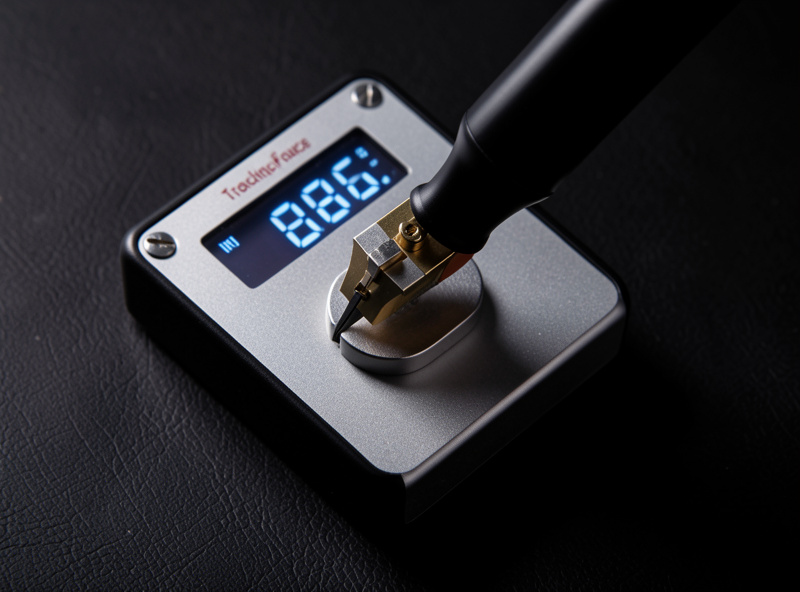
Tracking force is the downward weight your stylus presses into the groove, and getting it right is the single most important turntable adjustment. Set it to your cartridge’s spec — most moving-magnet cartridges want 1.5 to 2.0 grams — and confirm it with a digital gauge, not the counterweight dial. On my gauge, factory dials read 0.1 to 0.3 grams off routinely, and that gap is the difference between clean tracking and a stylus that skips, distorts, and chews your records.
This is the method I use on every cartridge I mount, with the numbers that matter and the symptoms that tell you when you have it wrong. It is part of the full turntable setup and calibration guide, and it pairs directly with the anti-skate setting, which you set right after.
What Tracking Force Actually Does
The stylus rides in a groove that is physically wiggling thousands of times a second, and tracking force — also called vertical tracking force, or VTF — is what keeps it pressed into contact with both groove walls so it can read those wiggles accurately. Too little force and the stylus loses contact on loud, complex passages, skating across the groove or buzzing with mistracking distortion. Too much and you press the stylus harder than the cartridge suspension was designed for, accelerating wear on both stylus and vinyl and dulling the top end.
There is a narrow correct window, and your cartridge manufacturer defines it. Inside that window the stylus tracks cleanly without excess wear. The whole job is landing inside it and confirming you are there with a number, not a feeling.
Find Your Cartridge’s Recommended Force First
Every cartridge has a recommended tracking force range printed on its spec sheet or the manufacturer’s site, usually given as a range with a recommended midpoint. An Audio-Technica VM95 family cartridge specifies 1.8 to 2.2 grams with 2.0 grams recommended; an Ortofon 2M Red sits at 1.5 to 2.0 grams with 1.8 recommended. Low-output moving-coil cartridges often want a slightly higher figure, commonly around 2.0 to 2.2 grams.
Use the manufacturer’s recommended figure as your target, not the bottom of the range. The bottom edge invites mistracking on demanding passages; the recommended midpoint is where the designer expects the suspension to work best. Write your number down — you will dial to it and then confirm it.
The Step-by-Step Adjustment
Start by balancing the tonearm to zero. With anti-skate off and the cueing lever down, rotate the counterweight until the arm floats dead level over the platter, neither dropping nor rising. Hold the counterweight still and turn only the numbered front ring to read zero. The dial is now calibrated to your arm’s true balance point.
Next, rotate the entire counterweight — ring and all — toward the front until the dial reads your target force. On most arms, turning the counterweight forward increases force. That puts you in the neighborhood. Now confirm: lower the stylus onto a digital stylus-force gauge placed at record height on the platter, read the actual force, and nudge the counterweight until the gauge matches your cartridge’s recommended number to within a few hundredths of a gram.

Why the Gauge Beats the Dial Every Time
The numbered ring on the counterweight assumes two things that are rarely perfectly true: that the counterweight is machined to an exact mass and that the arm bearing has zero friction. Real arms have a little bearing friction and real counterweights vary, so the printed dial drifts from reality. A digital gauge reading to 0.01 grams sidesteps all of it by measuring the actual force at the stylus tip.
This is not audiophile fussiness — it is the difference between guessing and knowing. A reliable digital stylus force gauge costs less than a budget cartridge and is the one setup tool I would never give up. As an Amazon Associate I earn from qualifying purchases. Place the gauge so the stylus contacts it at the same height it sits on a record, because measuring at the wrong height introduces a small error of its own.
Typical Tracking Force by Cartridge Type
Exact numbers always come from your specific cartridge’s sheet, but these ranges show where the main types land and why moving-coil generally runs a touch heavier:
| Cartridge Type | Typical VTF Range | Common Recommended | Notes |
|---|---|---|---|
| Entry moving-magnet | 1.5–2.5 g | 2.0 g | Conical/elliptical styli, forgiving |
| Mid moving-magnet | 1.5–2.0 g | 1.8 g | Nude elliptical, more sensitive to VTF |
| High-end MM (Shibata/MicroLine) | 1.6–2.0 g | 1.8 g | Fine-line profiles reward precision |
| Low-output moving-coil | 1.8–2.2 g | 2.0 g | Stiffer suspension, often heavier |
Too Light vs Too Heavy: Reading the Symptoms
If you have no gauge yet, the symptoms still tell you which way to move. Too light shows up as sibilance and buzzy distortion on loud vocals and massed strings, a stylus that visibly skips or slides, and a thin, edgy sound. Counterintuitively, too light is the more damaging error, because a mistracking stylus bounces in the groove and grinds at the vinyl.
Too heavy is subtler: a slightly dull, closed-in top end, less air around instruments, and over time faster stylus wear. When in doubt within the recommended range, err very slightly toward the heavier end of spec rather than the lighter — clean tracking protects records better than a featherweight setting ever will. But “within spec” is the rule; do not exceed the maximum to chase a sound.
Fine-Tuning Inside the Range
Once you are dialed to the recommended figure and confirmed by gauge, you have a small window to taste-tune. Within a cartridge’s stated range, a touch more force tends to firm up the bass and tame sibilance, while a touch less can open up the top end at the risk of mistracking. I make changes of 0.05 grams at a time, re-confirm on the gauge, and listen to the same demanding passage — a loud soprano or a busy orchestral peak — for buzz. If it buzzes, add force. If it is clean and a little dull, you have room to lighten slightly. Always finish by re-checking anti-skate, since the two interact.
Frequently Asked Questions
What tracking force should I use on my turntable?
Use the figure printed on your cartridge’s spec sheet, usually the recommended midpoint of its range. Most moving-magnet cartridges want 1.5 to 2.0 grams; many low-output moving-coils want 2.0 to 2.2 grams. Confirm the actual force with a digital stylus gauge rather than the counterweight dial.
Is too much or too little tracking force worse?
Too little is generally more damaging. A stylus tracking too light loses groove contact and bounces, carving mistracking distortion permanently into the vinyl. Too heavy mainly dulls the top end and speeds stylus wear. When unsure within spec, err slightly heavier for cleaner tracking.
Do I need a stylus force gauge or can I trust the dial?
You need a gauge. The numbered counterweight dial assumes a perfectly machined weight and a frictionless bearing, and real arms drift from that, often by 0.1 to 0.3 grams. A digital gauge reading to 0.01 grams measures the actual force at the stylus tip and removes the guesswork.
How do I balance the tonearm before setting force?
With anti-skate off and the cueing lever down, rotate the counterweight until the arm floats level over the platter. Then hold the counterweight still and turn only the numbered ring to read zero. The dial is now calibrated to your arm, and you can dial in the target force.
Does tracking force change with a new stylus?
Yes. Set tracking force to the new cartridge or stylus’s own spec, not the old one’s. Different stylus profiles and suspensions have different recommended forces. Re-confirm with the gauge whenever you change the stylus, and recheck anti-skate at the same time.